Showing posts with label art. Show all posts

Monday, August 31, 2015

The Animation Pipeline for Political Party Animals


As we inch ever slowly to a closed Alpha, we’re slowly building up our social media presence.  If you haven’t already, please do follow us and spread the word on Twitter and Tumblr.  We’ve had a pretty good run of bi-weekly testing and for the first time last week the latest version of the game was played by people from outside the team.  The results were encouraging, since both our friends Kyle and Gwen had fun playing (see Gwen's victorious pose), but there were definitely numerous things that we still have to work on.

In the meantime, let me show you my process for the creation and animation of our characters. Previously, I wrote about my decision to stick to frame by frame animation, mostly because it’s what I know best.  Now I’ll go into a little bit more detail in the hopes that you guys might pick up a thing or two from it, or tell me why what I’m doing is terribly wrong.  Let’s get started!

Part 1 : Concept Sketches


With each concept sketch I take an animal, assign its occupation, then make some sketches based on those two factors.  So for example the Crow is meant to be an investigator or reporter that digs up or fabricates dirt on other candidates. I'll usually spend around 10 hours or so first looking at reference material then sketching out concepts  and then coloring them in. If I had the time I would love to spend more time really doing a lot of concepts of each character but as it is I'm squeezing these in after work, which means an hour or two whenever I can find the time.

Part 2: Vectorizing


After the conceptualization is done I pick out my favorite concept animal (this is harder than it looks, and sometimes I have to ask my wife to help me choose) and render it in vector.  This is important in terms of efficiency because once the animal is in rendered this way it becomes much easier to resize it and use it for multiple purposes. It's also important for me to organize it properly in different layer folders.

So let's say for example that I wanted to make a character portrait for the Investigator.  I could just take the body and head part, resize it, and voila! A portrait for the Crow Investigator! It's important for small teams to always keep in mind different ways that they can make work more efficient, which is something I learned having usually worked as the sole artist for many games!

Part 3: Animate!


Now this is the meaty part, the animation!  We have a list of animations that each character has, for example we need animations for move, bribe, etc.  for this one I will show you the move animation for the Invesigator.  The first step is for me to sketch out a very small animation.  I sketch it small so that I don't overthink the details and just try to get a good sense of movement going.  I wanted him to be all sneaky like to fit his ability to fabricate scandals.

Once that's done I take the original vectorized image and then start making frames based on the smaller animation.  If I have time I will go ahead and sketch out larger frame by frame animations as well, but I usually make do with using the small animation as a reference.  This is where having separated the different body parts before is really key, as I can I much more easily pick out the body parts I want to animate and move them around rather than having to look through a whole mess of vector layers.


In about 2-4 hours I will have something like this!  I actually had quite a bit of trouble with this and had to refine the previous quick animation some more before I had an animation I was happy with.


This is an image showing the frame by frame animation within photoshop, so you have a better idea of how many frames I use.

Part 4 : Shrinkage


Once again this is where doing everything in vector pays off, as I can easily shrink the different frames of animations, flatten them, give them an outline an then save them one by one as pngs for use in the game.  We use 2dtoolkit for our animations, which I'm starting to realize may not be the best for a game with multiple animations.  The file organization for 2dtoolkit seems pretty primitive, and you can easily be overwhelmed with the sheer amount of individual images.  Right now we aleady use 213 sprites, and we're probably at 1/10 of the amount of animations we're planning to do.


And finally here is the Investigator in action in the game!  His special ability is to fabricate a scandal, which if it's revealed in the district will do massive damage to your opponents reputation.

Thanks for reading.  If you have any suggestions about how I can streamline my process without overhauling it entirely I would definitely love to hear from you!  To be one of the first people to try our closed alpha, please sign up for our mailing list!

Monday, June 29, 2015

Expressing Personality Through Animations

The Party Animals team is going heavily into revised game mechanics right now, and we're hoping to have something to share on that front very soon.  In the meantime I wanted to show off some of the animations I've been working on in my free time.  These animations will show up on the world map as your characters go around and do actions.  They will be much smaller than they are right now (see previous post), but I work on them on a much larger scale to inject as much personality into the animations as I can, hoping that some of that will translate even when the animations are reduced.


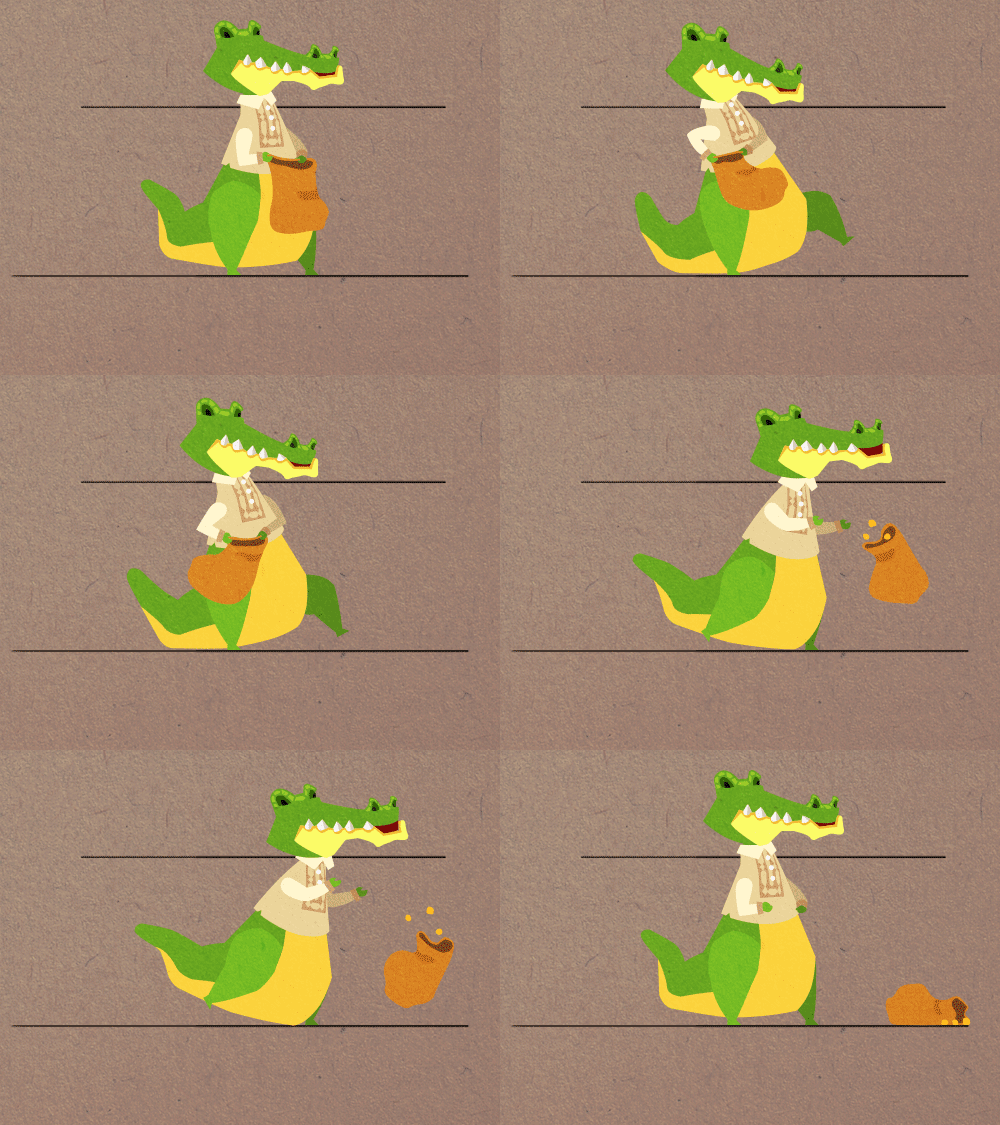
For example, let's take a look at the candidate Crocopio Imperial.  Croccy is the scion of a political family and is absolutely loaded with cash.  He's so rich that even while moving along the map he's already throwing money around.  The gleeful abandon with which he throws around money is almost infectious.


And when it's time to start bribing, he gives you the whole sack of cash.


The Investigator, who is a staff member you can hire, is much more stoic. Even when he gets mad there's a minimum amount of motion. I worry that this won't read very well when it's reduced, but it's a risk I'll take, since I feel it is very central to the Investigator's character that he doesn't have any wasted movements.


Except when he's exaggeratedly sneaking around, of course.


Contrary to the Investigator, the Police looks like she once wanted to be a disco dancer, flailing he arms and blowing that whistle as she redirects traffic for your candidate's convoy.


She's equally as exuberant when she's able to conduct a campaign successfully on your behalf.

These are just a few of the candidates and staff that we're going to have in the game.  We have a bunch more in store for you, and I'm excited to start working on them already. It's a lot of work animating them all, but I hope it'll be worth it in the end.  Please let us know what you think!

Thanks for reading.  If you want to be one of the first people to try our closed alpha, please sign up for our mailing list!


Tuesday, December 30, 2014

Political Party Animals December Devlog Update : More Political Machinations and some new art!

December has been a rather slow month for the team.  A storm earlier in the month delayed our weekly meetings, and the inevitable Christmas slowdown set in by the 23rd.  We're starting to get back on track now though, and looking forward to 2015.

More Political Machinations


The paper prototype phase has been very useful in making hard game design decisions about scope, but given we only meet once a week, in order to be efficient we need to find digital ways to test out game design ideas.  Our latest design that we wanted to test is called "Horse Trading".  Have you ever watched those political TV shows where the main character goes around making deals in order to push forward legislation?  For example, in one episode of Madame Secretary, Tea Leoni is trying to convince her husband to give the Russian Ambassador's daughter an A so that Russia will sell military technology to the Iranians, who will then release an American spy.  While we won't have anything quite that dramatic, the ability to make deals like that is central to politics, and it's one we hope to simulate.  Tristan has already talked about using Joris Dorman's "Machinations" to test out designs before, but this time we're giving you something that you can actually play with.

To try it, first download this xml file. Next, go to the Machinations website and click file>import and click on the horse trading xml file.  Then you can do the following:

1) Generate an Event
2) Do Quest- Do a quest for Kapitan 1 or Kapitan 2(costs resources)
3) Use Favor with Kapitan 1 to resolve quest for Kapitan 2 and Vice Versa
4) Make a Kapitan like the other Kapitan to reduce amount of Favor needed to resolve quests.(cost resources)

So here we are exploring ideas like using favors to satisfy the "quest" requirements of a Kapitan, improving relations between Kapitans to lower the cost of the requirements, and then in the end calculating the amount necessary in "resources".  Resources in this sense can be a variety of things, but starting from 100 to 0 we start to get a general idea of how much effort is required to make deals between Kapitans (100 being easy and 0 being a lot of effort).

As a bonus, here is another machinations xml called evil deeds, where we explored the cost to the reputation of candidates who indulge in shady tactics.

New Kapitan Art


Banker Bear

TV Network producer/Newspaper Editor

Rebel Kapitan

This month I finally had some to get back to designing characters, which was a refreshing change of pace!  We needed some new Kapitans to populate the new districts we created, namely the Bank, the TV Network, and the Rebel districts.  The Bank was created to give us a way to offer loans to the player, the TV Network introduces the media component of elections, and the rebels?  Well, the Rebel district was a bit of a lark. We had two farm districts side by side, which felt a bit redundant, so Julius suggested a Rebel district since many areas of the Philippines still have areas that are nominally controlled by rebels of different stripes.  

Thanks for reading.  If you want to be up to date on the latest Political Party Animals news, sign up for our mailing list!  

Saturday, July 12, 2014

Crow and Penguin Concept Sketches, plus Prototype Update

Recruitable Characters


We're still hard at work on the prototype, but that doesn't mean that I haven't been able to sketch out some more characters for Party Animals!  The two characters I'm introducing to you today are the first of what will be recruitable Party Animals.  Based on certain decisions you make they may decide to join your campaign and give you bonuses during your campaign activities.  Above you can see Felipenguin, an immigrant comedian from the South Pole.  Felipenguin is the stereotypical demanding celebrity, requiring 24/7 airconditioning, rare delicacies from his homeland in the South Pole, and a constant supple of yellow colored M&Ms.  His popularity cannot be underestimated, and he will increase the effectivity of your photo ops and sorties exponentially.


Next up is Franciscrow, a disgraced former Police Chief turned Private Investigator.  Franciscrow's looking for revenge on the upstart detective that ratted him out and became Police Chief in his stead.  In meantime, he's willing to dig up dirt on your rivals and give you information on how to win over the Kapitans...for a price.

Prototype Updates


Progress on the prototype has been slow but steady, and we've now implemented the simulation of day to day campaign activities.  Next up we'll be working on events, which are the storylines that create the bulk of the experience in Party Animals and will provide the moral choices that we think will make the game quite memorable.  We've been working a lot on developing the character backstories and creating events and storylines for them that will be unique, and we're excited to share this with you in a couple of weeks (yeah I know we said the same thing two weeks ago).  In the meantime, until we're satisfied with this prototype you still have time to sign up for our mailing list and be among the first to try out the game and give us your all-important feedback, so please do sign up!

Saturday, June 28, 2014

Partially Healed Knees, New Maps and Animations, and A Prototype (Announcement)!

Mine
Hey folks, I know that it's been a while since we've last blogged, and that's because we've been hard at work!  Quite a few things have been happening lately, and I just want to go through a couple of them before we get into the update.  First off, I'm walking again!  I'm not sure I mentioned it but when I got back from Japan I had a knee injury that kept me off my feet for 3 months.  It was a long and frustrating road but I'm mostly recovered now and so we're gaining a lot of steam with regards to development.  I'm personally stoked and I've been hard at work tinkering with the art.

Maps and Animations


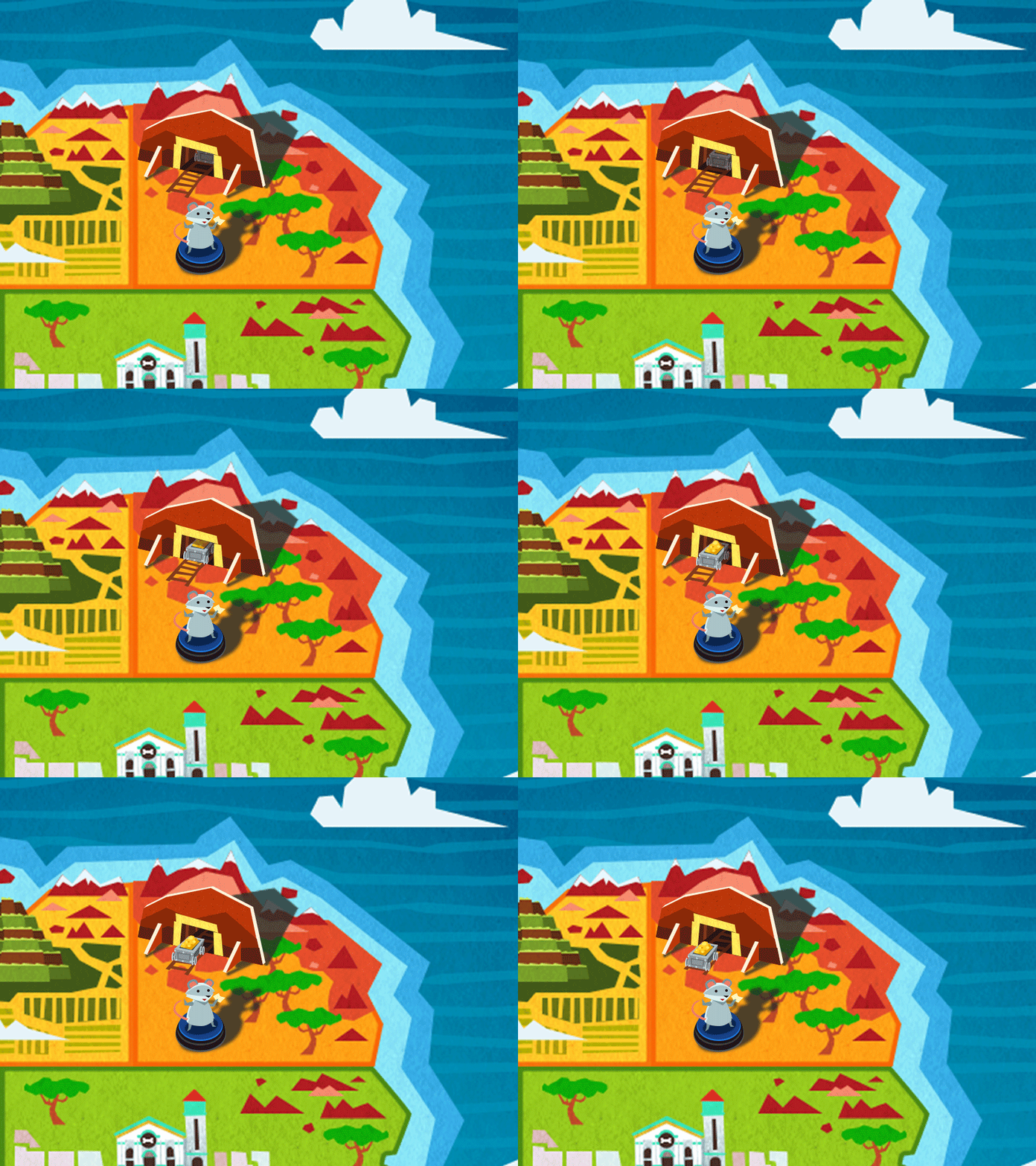
This time I've been playing with our world map.  The last time I worked on the map I made some changes to the colors and added some new landmarks.  I'd felt for a long while that it looked good but lacked something to make it 'pop'.  Well I took that to heart and turned our locations like the casino and the mine into pop-up like images.  I quite like how everything looked, and I even added some little animations to them to make them more fun when they're zoomed in.  My current favorites are the mine (seen at the top of the page), the cathedral, and the fishing village, but there's a lot more in the pipeline.  This new board game look is really starting to come together, and I like to imagine this map in Mousey's campaign headquarters as the campaign team debates their options.

Cathedral
Fishing Village

Prototype!


Second, We have a proper game designer on board!  I'll get into the details later but this guy is a friend of ours and has been around the game dev scene for a long time.  We're really lucky to have him.  That means that with me on art, Julius on code, and our friend on design, we have a solid team onboard to make the game.Speaking of which, we're working on a prototype!  I know, I know, we should have been working on a prototype a long time ago but we fell into multiple first time indie developer traps and we've only now got our act together to put a prototype together to test our ideas. This is the prototype we're showing off to publishers to try to sell them on the game, so we'd definitely love some feedback from you guys.  As a treat we're going to share this prototype to the first few people to sign up on our mailing list so if you're keen to try the game out please do sign up in the next couple of weeks!

Kapitan Relationships

The Ititerary Metaphor brought to life
You can see a sample of the prototype above.  I should say that graphically the prototype will look nothing like the real game.  On one of the Game Design Roundtable podcasts I heard one of the hosts say that they regularly make prototypes of their games in engines or languages that are entirely different from what they'll use to create the final game.  They did this to make sure that they would feel free to experiment, since they wouldn't have to worry about making sure that the code they wrote would be usable in the final product.  I think it's a great idea and we've moved forward at a much faster clip ever since we decided to do this.  Well, that's all for now, and do make sure you sign up if you're interested in trying out the protoype!

Saturday, May 10, 2014

Why I chose Hand Drawn Animations over Puppet Animations for Party Animals

Spriter vs Photoshop


I said I would experiment with the animation tool Spriter in a previous post to see if it would be a good fit for our game.  I did, and I decided that as great as Spriter is, it just doesn't make sense for us to use it in our game.  In my first few hours with Spriter it became clear to me that to create good animations with it would require a lot of skill and time.  Otherwise they'd look exactly like their namesakes : puppets.  Given the fact that I only really have a few animations I need to create for the game the efficiency gained from doing puppet animations vastly decreases.


The way that 2D toolkit creates animations in Unity also helped to make my decision.  2Dtoolkit takes complete frames of animation then creates a texture atlas out of them that you can draw from when creating specific animations.  This means that I wouldn't be able to manipulate the animations directly in Unity.  Given that the required output for me was going to be the same anyway (ie full frames of animation), it just made more sense to stick with a software and process that I knew instead of taking the time to learn a new one.  I would also have to use less software to get to the final product.  If I were to use Spriter I'd first have to create the assets in PS, arrange and animate them in Spriter, and finally export them to Unity.  Whereas now I'd do the first to steps in PS and export to Unity immediately after, bypassing Spriter entirely.


I also experimented a little bit with Photoshop's timeline animation courtesy of this video by Alex Grigg.  While I learned a lot and am amazed at what you can do with PS in terms of animation, I once again came to the conclusion that trying to do it that way was just using a far too complicated too for a simple task.  And so ironically after trying out all these different ways to animate our characters, I ended up going back to animating the only way I know how, which is frame by frame.


Here is the walk animation of our main character Mousey (yes, we still haven't given her a real name).  This was relatively easy to do since I used a walk cycle guide.  In the next few images I'll take you through the steps of how I made a hand drawn victory animation without a guide.

Victory


Step 1 is to rough out the basic animation.  I do this very small, since it's easier to capture  the essence of the movement with smaller strokes.  I've laid out the frames horizontally to show you how they look but typically I would draw each frame one on top of the other.


Step 2 is to enlarge the original rough animation then trace over it so that I have a larger version that I can use as a guide for the final animation.  Drawing bigger will reveal flaws that were masked by the initial smaller animation, which I can fix here.  As with concept art, the general rule is to try to fix things while they're being sketched instead of closer to the final product.  You save yourself a lot of heartache that way.


Step 3 is to take a pre made mouse model and arrange it according to the rough animation.  I've separated each body part into layers so they're easier to work with, and I've drawn them in vector to make it more efficient to move around and reposition without any artifacting.  I'm showing you my layers here as a guide.


Step 4 is to animate! Here's my animation timeline.  As you can see it's relatively simple, just 5 frames.  I hold frame 2 for just a fraction longer than the rest of the frames (except frame 1, which is the at rest frame) to show that the mouse is gathering her energy to jump.  Frame 4 barely comes into frame and is only really there to smooth out the transition between frames 3 and 5.  Frame 6 is a reused frame 2 as a landing frame.  One of my issues with PS frame by frame animation is that the times you can hold the animations are so specific (0,0.1,0.2,0.5) so there's little leeway with timing the animations.  I think that 2D toolkit gives you better control with that, but I've still to experiment further.


And here is the final animation!

Final Thoughts


I didn't write this post to say that Spriter sucks and that frame by frame animation is better (I was very happy to support them by buying a Pro license, though they have demo that's free of charge).  I'm really not an animation expert, and the truth is that each project requires specific animation tools.  Ultimately if you already know how to do puppet animation then it's definitely much more efficient since no time would have to be taken to learn how to do it properly.  But for me, it's frame by frame for now.  As an aside here is an argument for hand drawn animation and one for puppet/modular animation, in case anyone out there is still debating which method to use.

If anyone out there knows that I'm making a huge mistake here and can point out to me why what I'm doing is wrong, please don't hesitate to comment!  If you think my frame by frame animation sucks and I could makes some changes to make it better I'd love to hear from you too.

Saturday, May 3, 2014

World Map Update


Hi all, just a quickie update here on our world map.  Compared to the previous versions of the map I've added some new landmarks and also experimented a little bit with some animations. That's all for now, more next week!

Wednesday, April 23, 2014

Goat and Dog Concept Sketches

I'm back with some more concept sketches for you, this time of the Goat and Dog Kapitan.


The goat Kapitan is based on some of the indigenous tribes of the Philippine highlands.  I say "some of" because there are many of these indigenous tribes, and I wanted to represent them overall and not one specific tribe.  These tribes are some of the earliest inhabitants of the Philippine islands.  Similar to their aboriginal cousins in South America, they face many difficulties integrating into modern society, and this goat Kapitan reflects those issues.


The dog Kapitan is quite obviously based on the religious groups in the Philippines.  Religion, for good and ill, continues to play a very strong role in Philippine society.  While there is technically a separation between Church and state, various religious groups hold a lot of sway over their parishioners, and inevitably sway politicians.  In fact, in 2004 and 2010 Bro. Eddie Villanueva ran for the President of the Philippines (finishing a distant fifth).  Religion is at best a sticky topic, and we don't want it to be a distraction from the main game.  To heighten the sense of satire (at this point I'm starting to think we should call the game an allegory) I've decided to create a fictional religion whose symbol is a bone.  Surely that can't be taken too seriously by anyone.


I've also taken the initial Kapitan Sketches and created more polished final art from them.  As you can see from this comparison between the original rushed in-game art and the new Kapitans, there's a bit of differences in terms of look and polish, which means I'll have to revisit these older sprites at some point (really boring but necessary work).  


Lastly, in our dialogue screens with the Kapitans, I'm also hoping to have the Kapitans react emotionally to what you say to them.  Their emotions will be pretty binary, but I wanted an "active" angry versus a "passive angry" and vice versa.  The "active" images will show up when you initially displease a Kapitan, after which they will settle into the "passive" image.

That's it for now.  In the next few weeks I'll be experimenting with animation in spriter to see if there's any point to moving to rigged animation versus straight up hand drawn keyframes.  Stay tuned for more!

Saturday, March 22, 2014

Lizard and Pelican Concept Sketches

Behind the scenes we are madly restructuring the game mechanics of Party Animals.  It's very exciting for us, but also frustrating that we cannot share anything yet since everything is in such flux.  I have been on a roll with these concept sketches though, so I here are some more characters that may find their way into Party Animals!


Pirate/merchant/smuggler Lizard.  This character draws on our complex relationship with successful Chinese immigrants, and a semi historical pirate that tried to create his own kingdom in the Philippines (he failed, btw).


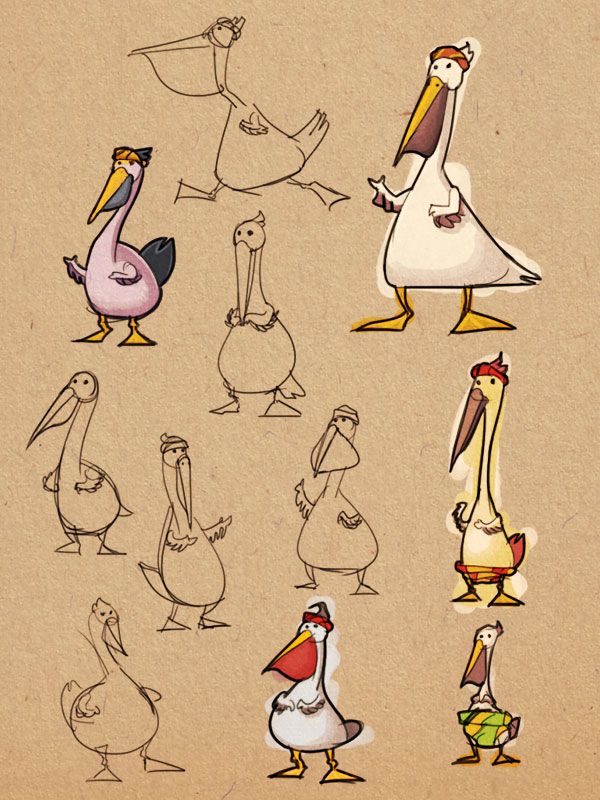
Chieftain Pelican.  He represents the interests of the tribal villages outside of the city.  He constantly worries about how modernization is affecting their way of life, and where he is going to get his next fish.

Tuesday, March 18, 2014

Tortoise and Otter Concept Sketches

I arrived from Bitsummit last week ready to get back to work, instead I got Patellar Bursitis so I spent the past week or so recuperating and writing about some tips on attending Bitsummit here and here.  Events like Bitsummit are great for getting your team into gear and producing something on short notice.  But it's also nice to be able to relax, take a look at what's going on, and reassess everything.  We're still tinkering with some of the key game design concepts of Party Animals, and since I can't participate in the face to face meetings I'm working on some worldbuilding stuff that I'm SURE will be useful at some point down the line.  That includes sketching out some new characters, including the tortoise and otter I'm sharing with you today!


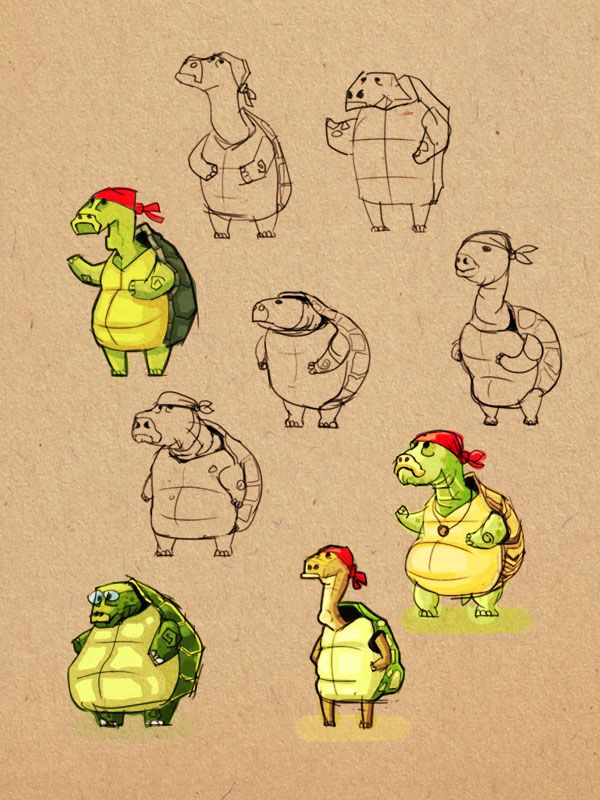
The tortoise is the head of the Stevedore's Union, and he represents the interests of dock workers in the capital city.  Given tortoises generally live to a ripe old age, I wanted the character to look old but tough.


The otter is a pearl diver who represents the interests of her water-based community.  She worries about the effects of big business on the pearls that her livelihood depends on.

Wednesday, March 5, 2014

Party Animals' "Manual"

Well I'm off to Bitsummit in Kyoto tomorrow and I am both excited and terrified all at the same time!  We'd been planning on going for the past two months and working like crazy t make a decent prototype...but we basically failed.  We have a prototype of the sortie system in the game and a basic wrapper for a strategy game but not much else.  This was due to a variety of reasons, one of which Julius pointed out with his Loom discussion in the past post.  There's no backing out of Bitsummit though, as tickets and accomodations have been booked, and in any case the networking and handshaking I'll be doing there will be more than worthwhile.  But just so that we could present something to interested reporters, I worked on an explainer PDF of sorts that I could show off to reporters while I'm there.  In essence it's like a Kickstarter marketing pitch in PDF form, but I also imagined it as an SNES-style manual for the game.  I realize now that we probably haven't done a good job of explaining how the game in our heads would work, so I'm happy to share this with all of you ahead of Bitsummit.

If you want to download a PDF version of this head on to our presskit at heypartyanimals.com


Party Animals Copyright © 2011 -- Template created by O Pregador -- Powered by Blogger